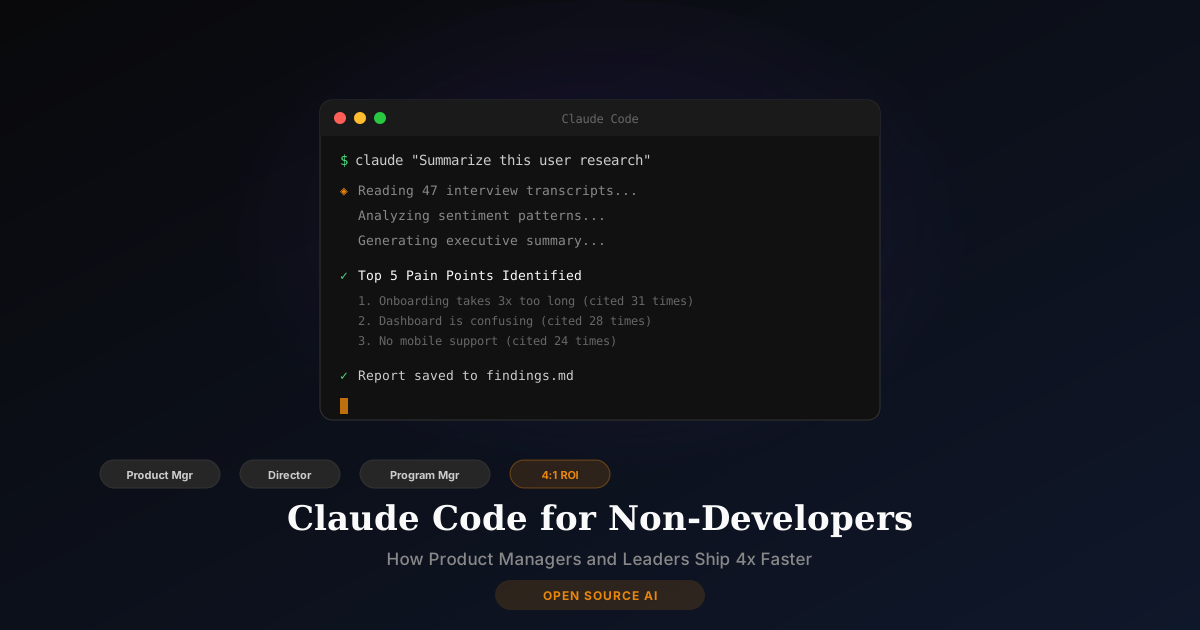
There's a widespread misconception that Claude Code is only for software developers. It's in the name — "Code" — so it must be for coders, right?
Wrong. Claude Code has quietly become one of the most powerful productivity tools for product managers, program managers, directors, and business leaders who have never written a line of code in their life. Anthropic reports that non-engineering use cases are among the fastest-growing segments of Claude Code adoption.
This guide explains what Claude Code is, why it matters for your role, and how to start using it — written for the person who thinks "terminal" is where you catch a flight.
What Is Claude Code?
Claude Code is an AI tool made by Anthropic (the company behind Claude) that can:
- Read, write, and edit files on your computer
- Run commands and scripts
- Search through documents and codebases
- Manage projects and workflows
- Answer complex questions with access to your actual files and data
It comes in two forms:
- CLI (Command Line Interface) — runs in your terminal
- Desktop App — a visual interface that's more approachable for non-developers
The key difference from regular Claude (the chatbot): Claude Code can see your files, take actions on your computer, and work with your actual data — not just answer questions in a chat window.
Why Should Non-Developers Care?
Here's what's happening in organizations right now: product managers who use Claude Code are shipping 164% more features than those who don't. That's not a typo — Faros AI measured a 4:1 ROI across engineering teams that adopted it.
But the real story is what's happening outside of engineering:
Product Managers Are Using It To:
- Write PRDs and specs from rough notes in minutes
- Analyze user data by pointing Claude Code at CSV exports and asking questions in plain English
- Prototype features without waiting for engineering sprints
- Generate SQL queries to pull metrics without bothering the data team
- Create presentations by summarizing project documents
Directors and Program Managers Are Using It To:
- Automate status reports by pulling data from project files
- Build simple dashboards from spreadsheet data
- Draft policy documents with proper formatting and structure
- Analyze vendor proposals by having Claude Code compare documents side by side
- Create SOPs from existing process documentation
Business Leaders Are Using It To:
- Competitive analysis — have Claude Code research and summarize competitor products
- Financial modeling — point it at spreadsheets and ask "what if" questions
- Email drafts — compose complex communications from bullet points
- Meeting prep — summarize documents and create talking points from project files
The ROI Case: How to Justify Claude Code to Leadership
If you need to make the business case, here are the numbers:
| Metric | Value | Source |
|---|---|---|
| ROI | 4:1 return on investment | Faros AI |
| Cost per incremental output | $37.50 vs $150 traditional | Faros AI |
| Feature delivery increase | 164% more stories completed | Enterprise case studies |
| Time saved on documentation | 60-70% reduction | PM workflow studies |
| Adoption rate | 1 in 5 businesses on Ramp now pay for Anthropic | Ramp spending data |
Pricing That Makes Sense
- Pro plan: $20/month — good for individual exploration
- Max plan: $100-200/month — serious daily usage (most PMs end up here)
- Team plan: $25-30/seat/month — for departments
- Enterprise: $60/seat/month (70-seat minimum) — for organizations
Compare that to hiring a data analyst ($80K+/year) or waiting 3 sprints for engineering to build your dashboard. At $100/month, Claude Code pays for itself in the first week.
How to Get Started (No Technical Background Needed)
Step 1: Choose Your Interface
- Desktop App — recommended for non-developers. Visual interface, no command line needed.
- CLI — more powerful, but requires comfort with a terminal window
Step 2: Create a CLAUDE.md File
This is a plain text file that tells Claude Code about your role, your projects, and your preferences. Think of it as onboarding your AI assistant. Example for a product manager:
# My Context
I'm a Senior Product Manager at [Company]. I work on the customer onboarding team.

# What I Need Help With
- Writing PRDs and feature specs
- Analyzing user research data (CSV, spreadsheets)
- Creating presentations from project documents
- Drafting stakeholder communications

# My Preferences
- Write in clear, non-technical language
- Always include data to support recommendations
- Format documents in our company template style
Step 3: Start With Real Work
Don't experiment with toy examples. Drop a real document, spreadsheet, or project folder and start asking questions:
- "Summarize the key findings from this user research CSV"
- "Draft a PRD for the features described in these meeting notes"
- "Create a comparison table of these three vendor proposals"
- "Generate a project status report from these sprint files"
Security: Is It Safe for Your Data?
This matters, especially if you work with sensitive information:
Anthropic's security certifications:
- ISO/IEC 27001:2022 (information security management)
- ISO 42001:2023 (AI management system)
- SOC 2 Type II (service organization controls)
- FedRAMP High (federal government authorization)
What this means: Claude Code has the broadest security certification portfolio of any AI coding tool. If your organization works with the federal government or handles sensitive data, Anthropic has invested heavily in compliance.
Important: With the Team and Enterprise plans, Anthropic does not train on your data. Your code and documents remain private.
Claude Code vs Other AI Tools
Claude Code vs ChatGPT
ChatGPT is a chatbot — you type, it responds. Claude Code is an agent — it can access your files, run commands, and take multi-step actions. For simple Q&A, ChatGPT works fine. For working with your actual projects and data, Claude Code is in a different category.
Claude Code vs Cursor
Cursor is an IDE (code editor) with AI built in. It's designed for developers who write code all day. Claude Code works with any file type — documents, spreadsheets, data files, not just code. For non-developers, Claude Code is the better choice.
Claude Code vs OpenClaw
OpenClaw is a general-purpose AI agent for life and business tasks (email, messaging, research). Claude Code is specifically powerful for working with files, documents, and data on your computer. They complement each other — many power users run both.
Real-World Example: A PM's First Week With Claude Code
Sarah, a product manager at a mid-size SaaS company, started using Claude Code with zero technical background:
Day 1: Dropped a folder of user interview transcripts. Asked Claude Code to identify the top 5 pain points with supporting quotes. Got a structured report in 3 minutes that would have taken her a full afternoon.
Day 3: Pointed it at 6 months of customer support tickets (CSV export). Asked for trends by category, severity, and customer segment. Got an analysis with charts she could paste directly into her quarterly review.
Day 5: Described a feature she wanted to prototype. Claude Code built a working HTML mockup she could show stakeholders, complete with realistic data. No designer or developer needed.
Day 7: Created a CLAUDE.md file with her team's documentation standards. Now every PRD, spec, and status report Claude Code generates follows her company's format automatically.
How I Help You Get Set Up
Setting up Claude Code properly makes the difference between "this is confusing" and "this changed how I work." I offer a $99 one-hour setup session where I:
- Install Claude Code CLI and Desktop App on your machine
- Configure your API keys and model preferences
- Create a custom CLAUDE.md file for your role and workflow
- Set up MCP servers for your specific tools
- Walk you through the workflows that matter for your role
Most of my clients are non-technical. That's the whole point — I handle the technical setup so you can focus on the work.
Frequently Asked Questions
Do I need any coding experience to use Claude Code?
No. The Desktop App provides a visual interface. You interact with Claude Code in plain English. If you can write an email, you can use Claude Code.
Is Claude Code worth $100-200/month for a non-developer?
If it saves you 5+ hours per week on documentation, data analysis, and research — and for most PMs it saves more — that's easily $500-1,000/month in time value. The ROI is clear within the first week.
Can Claude Code access my company's private files?
Claude Code works with files on your local machine. It can read documents, spreadsheets, and data files you point it to. With Team/Enterprise plans, nothing is used for training. Check with your IT team about your organization's AI usage policies.
What's the difference between Claude (the chatbot) and Claude Code?
Claude is a web-based chatbot for conversation. Claude Code is an agent that works with your actual files and can take actions on your computer. Think of Claude as a consultant you talk to, and Claude Code as an assistant who sits at your desk and does the work.
How does Claude Code compare to hiring an analyst or assistant?
An entry-level data analyst costs $60-80K/year. A virtual assistant costs $2-5K/month. Claude Code at $100-200/month handles many of the same tasks — data analysis, report generation, document creation, research — instantly and on-demand. It doesn't replace human judgment, but it dramatically reduces the time from question to answer.
Want Claude Code set up for your workflow? Book a setup session or schedule a free discovery call to see if it's right for your role.